Client-side load balancing using Netflix Ribbon
Implementing client-side load balancing provides a way to distribute the load across multiple instances. The Discovery server returns the location of these multiple instances. The multiple instances are only for resilience and load-sharing, but the client needs to pick only one instance of the service. So, Spring Cloud Netflix Ribbon comes into the picture and provides several algorithms for client-side load-balancing. Spring also provides a smart RestTemplate.
Spring's RestTemplate is a smart client to call microservices registered on the Eureka server, and it automatically integrates two Netflix utilities, such as the Eureka Service Discovery and Ribbon client-side load balancer. Eureka returns the URL of all available instances. Ribbon determines the best available service to use. Just inject the load-balanced RestTemplate by using the @LoadBalanced annotation. Service Discovery is automatic lookup by using logical service-name of registered microservice.
Project setup
spring init -d=cloud-ribbon,cloud-eureka,web,thymeleaf -n=ribbon-client ribbon-client
Using service at https://start.spring.io
Project extracted to '/home/admatic/ribbon-client'
Ribbon is a client-side load balancer that gives you a lot of control over the behavior of HTTP and TCP clients. And RestTemplate can be automatically configured to use Ribbon. To create a load-balanced RestTemplate, create an @Bean RestTemplate and use the @LoadBalanced qualifier:
cd ribbon-client/

cat << EOF > src/main/java/com/example/ribbonclient/RibbonClientApplication.java
package com.example.ribbonclient;

import org.springframework.boot.SpringApplication;
import org.springframework.boot.autoconfigure.SpringBootApplication;
import org.springframework.cloud.client.loadbalancer.LoadBalanced;
import org.springframework.cloud.netflix.eureka.EnableEurekaClient;
import org.springframework.context.annotation.Bean;
import org.springframework.web.client.RestTemplate;

@SpringBootApplication
@EnableEurekaClient
public class RibbonClientApplication {

    public static void main(String[] args) {
        SpringApplication.run(RibbonClientApplication.class, args);
    }

    @Bean
    @LoadBalanced
    public RestTemplate restTemplate() {
        return new RestTemplate();
    }
}
EOF
Now let's create a service by using this RestTemplate and call the service registered with Eureka:
mkdir -p src/main/java/com/example/ribbonclient/service

cat << EOF > src/main/java/com/example/ribbonclient/service/HelloServiceClient.java
package com.example.ribbonclient.service;

import org.springframework.beans.factory.annotation.Autowired;
import org.springframework.cloud.client.loadbalancer.LoadBalanced;
import org.springframework.stereotype.Service;
import org.springframework.web.client.RestTemplate;

@Service
public class HelloServiceClient {

    @Autowired
    @LoadBalanced
    RestTemplate restTemplate;

    public String sayHello() {
        return restTemplate.getForObject("http://SPRING-CLOUD-EUREKA-CLIENT/hello", String.class);
    }
}
EOF
As you can see, here we have autowired the load-balanced RestTemplate to call the services. The RestTemplate is nothing but a high-level implement of the HTTP Client and exposed several methods to call services. But these methods need a URI, and the URI needs to use a virtual host name that is service name, not a host name.
Create a Web Controller
mkdir -p src/main/java/com/example/ribbonclient/controller

cat << EOF > src/main/java/com/example/ribbonclient/controller/HelloWebController.java
package com.example.ribbonclient.controller;

import org.springframework.beans.factory.annotation.Autowired;
import org.springframework.stereotype.Controller;
import org.springframework.ui.ModelMap;
import org.springframework.web.bind.annotation.GetMapping;

import com.example.ribbonclient.service.HelloServiceClient;

@Controller
public class HelloWebController {

    @Autowired
    HelloServiceClient helloServiceClient;

    @GetMapping("/say-hello")
    String sayHello(ModelMap model) {
        model.put("message", helloServiceClient.sayHello());
        return "hello";
    }
}
EOF
This web controller has one request handler method, sayHello(), and it populates the model object with the message returned by the HelloServiceClient, and fetched data from our REST service. Here, dependency for starters, such as spring-boot-starter-web and spring-boot-starter-thymeleaf, is used to present a view.
mkdir -p src/main/resources/templates/

echo '<!DOCTYPE html>
<html xmlns:th="http://www.thymeleaf.org">
    <head>
        <title>Say Hello Page | admatic.in</title>
    </head>
    <body>
        <h2 th:text="${message}"/>
    </body>
</html>' | tee src/main/resources/templates/hello.html
This is the thymeleaf view file, which renders the view and value of the message return from the controller.
Let's see the application configuration class application.yml:
cat << EOF > src/main/resources/application.yml
spring:
  application:
    name: spring-cloud-ribbon-client

server:
  port: 8282

eureka:
  client:
    service-url:
      default-zone: http://localhost:8761/eureka
  instance:
    prefer-ip-address: true
EOF
Run the Ribbon Client
mvn spring-boot:run
Open the browser with the http://localhost:8761/ URL:

curl http://localhost:8282/say-hello
<!DOCTYPE html>
<html>
    <head>
        <title>Say Hello Page | admatic.in</title>
    </head>
    <body>
        <h2>Hello from Admatic from EurekaClient!</h2>
    </body>
</html>
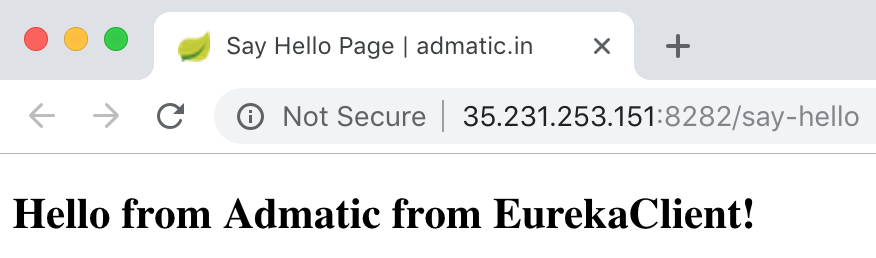
As you can see, RestTemplate called the SPRING-CLOUD-EUREKA-CLIENT service registered with Eureka to fetch the Hello from Admatic from EurekaClient! string.