Essential Key Components
These four core key components are the reason behind Spring Boot's magic.
- Spring Boot Starters
- Automatic configuration
- Spring Boot CLI
- Spring Boot Actuator
Spring Boot Starters
Starter is like a small Spring project for each module such as web MVC, JDBC, ORM, and so on. For your Spring application, you just add the starters of the respective module in the classpath, and Spring Boot will ensure that the necessary libraries are added to the build by using Maven or Gradle.
Suppose you want to create a web application or an application to expose RESTful services using the Spring web MVC module to your Spring application; just include the spring-boot-starter-web dependency in your project, and you are good to go.
<dependencies>
   <dependency>
         <groupId>org.springframework.boot</groupId>
         <artifactId>spring-boot-starter-web</artifactId>
   </dependency>
</dependencies>
Spring Boot provides the following application Starters under the org.springframework.boot group:
spring-boot-starter-web-services: For building applications exposing SOAP web servicesspring-boot-starter-web: Build web applications and RESTful applicationsspring-boot-starter-test: Write great unit and integration testsspring-boot-starter-jdbc: Traditional JDBC applicationsspring-boot-starter-hateoas: Make your services more RESTful by adding HATEOAS featuresspring-boot-starter-security: Authentication and authorization using Spring Securityspring-boot-starter-data-jpa: Spring Data JPA with Hibernatespring-boot-starter-cache: Enabling the Spring Framework's caching supportspring-boot-starter-data-rest: Expose simple REST services using Spring Data REST
Spring Boot Starter Parent POM
The Starter Parent POM defines key versions of dependencies and Maven plugins. It typically uses spring-boot-starter-parent as the parent in the pom.xml file:
<parent>
   <groupId>org.springframework.boot</groupId>
   <artifactId>spring-boot-starter-parent</artifactId>
   <version>2.0.2.RELEASE</version>
   <relativePath/> <!-- lookup parent from repository -->
</parent>
Spring Boot Starter Parent POM allows us to manage the following things for multiple child projects and modules:
- Configuration: Java version and other properties
- Dependency management: Version of dependencies
- Default plugin configuration: This includes configurations such as build plugins
It is an easy way to bring in multiple coordinated dependencies including transitive dependencies.
Spring Boot auto-configuration
Spring Boot can automatically provide configuration for application functionality, which is common to many Spring applications.
Spring Boot provides the auto-configuration feature in the following ways:
- First, Spring Boot looks for frameworks available on the classpath
- After that, it checks existing configuration for the application
Based on these points, Spring Boot provides the basic configuration needed to configure the application with these frameworks. This is called auto-configuration.
Enabling Spring Boot auto-configuration
Spring Boot provides the @EnableAutoConfiguration annotation that is responsible for enabling the auto-configuration feature. This annotation is used in the main application file of the Spring Boot application. The @EnableAutoConfiguration annotation on a Spring Java configuration class causes Spring Boot to automatically create beans it thinks you need, usually based on classpath contents, that it can easily override.
@Configuration
@EnableAutoConfiguration
public class MyAppConfig {
   public static void main(String[] args) {
   SpringApplication.run(MyAppConfig.class, args);
   }
}
@SpringBootApplication annotation has composed functionality from three annotations - @EnableAutoConfiguration, @ComponentScan, and @Configuration. If you want to exclude auto-configuration for some of the modules, then you use the exclude property of @SpringBootAnnotation
@SpringBootApplication(exclude = {DataSourceAutoConfiguration.class, HibernateJpaAutoConfiguration.class})
public class MyAppConfig {
   ...
}
Let's see the following diagram that explains all about the Spring Boot auto-configuration feature:
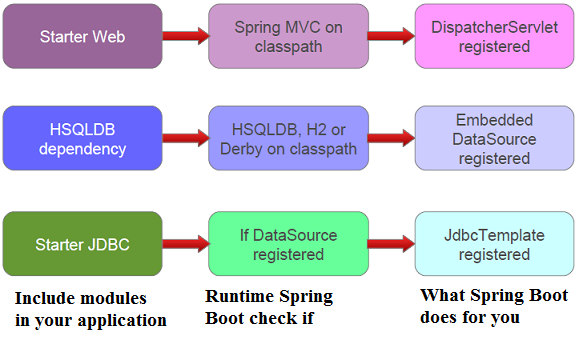
Spring Boot CLI
Spring Boot also provides a command-line tool that can be used to quickly write Spring applications. You can run Groovy scripts with Spring Boot CLI. Groovy code has almost zero boilerplate code compared with Java.
@RestController
class ThisWillActuallyRun {
    @RequestMapping("/")
    String home() {
        "Hello World!"
    }
}
spring run app.groovy
curl localhost:8080
Hello World!
We don't have Maven or Gradle here. CLI is smart; it detects classes being used in your application and it also knows which Starter dependencies should be used for these classes; accordingly, Spring Boot CLI adds dependencies to the classpath to make it work.
As Spring Boot CLI adds dependencies, a series of auto-configuration kicks in and adds the required bean method configuration so that your application is able to respond to HTTP requests.
Spring Boot Actuator
The Actuator provides data on auditing, metrics, and the health of your Spring Boot application using HTTP endpoints or with JMX. It helps to you manage your application when it's pushed to production.
The Actuator installed in a Spring Boot application provides the following benefits:
- It provides details of all beans configured in the Spring application context
- Actuator also provides details about Spring Boot's auto-configuration
- It also ensures all environment variables, system properties, configuration properties, and command-line arguments are available to your application
- The Actuator gives various metrics pertaining to memory usage, garbage collection, web requests, and data source usage
- It provides a trace of recent HTTP requests handled by your application
- It also gives information about the current state of the threads in the Spring Boot application
Spring Boot Actuator provides the listed information in two ways:
- You could use web endpoints
- Or you could use it via a shell interface